Apple TV 2.3 - new update is out Cracked iPhone Apps for dummies
Nov 23

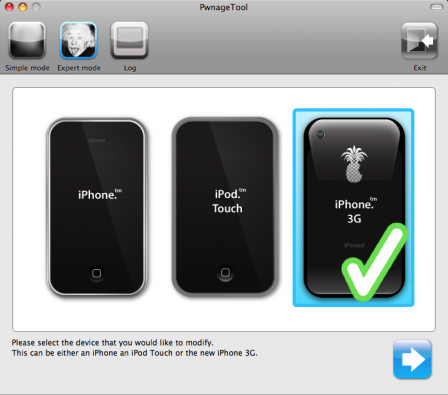
QuickPwn (Mac) PwnageTool 2.2.1 (Mac) QuickPwn (Win)
Download QuickPwn 2.2 (Mac) Version 2.2

Downloaded 580 times

Download PwnageTool 2.2.1 (Mac) Version 2.2.1

Downloaded 809 times

Download QuickPwn 2.2 (Windows) Version 2.2

Downloaded 950 times

If you need to download the new 2.2 firmware, click the link below

iPhone firmware 2.2 for 2G iPhone firmware 2.2 for 3G
Download iPhone 2G 2.2 (5G77) firmware Version 2.2

Downloaded 599 times

Download iPhone 3G 2.2 (5G77) firmware Version 2.2

Downloaded 706 times


Similar Posts:

written by admin

One Ping to “iPhone firmware 2.2 - Jailbreak and Unlock”

  1. iPhone 3G unlock tutorial with Yellow Snow » Mac OSx86 Says:

    [...] First you will need to update to firmware 2.2 and jailbreak it. All the required software you will need is available here [...]


13 Responses to “iPhone firmware 2.2 - Jailbreak and Unlock”

  1. 1. amitabh bacchan Says:

    i downloaded the program but this shit does not anything. i clicked on the exe file and nothing happens. how am I supposed to use this file under xp? man, wtf no fucking instruction

  2. 2. amitabh bacchan Says:

    I AM SO SORRY ABOUT MY PAST COMMENTS. THE JAIL BREAK WORKED THIS MORNING. I GUESS I HAD TO START FRESH. IT WORKED LIKE CHARM WITH MY LASTEST 2.2 5G77 WHICH IS LATEST. PLEASE DELETE MY OLD POST. AGAIN I AM VERY SORRY. MY 3G IS FINALLY JAIL BREAKED.

  3. 3. admin Says:

    Glad to see it worked for you. WTF @#!?#!! Sorry :-)

    The instructions are available in a previous post, since they are the same, no need to rewrite them with each release.

    Anyone who needs instructions, just follow this link : http://www.macgeekblog.com/blog/archive/2008/07/19/pwnage-20-jailbreak-iphone-3g-now.html

  4. 4. Andres Says:

    Hi, I just downloaded the latest version to unlock, the 3G 2.2.1 (5G77) but when I try to lauch the program to unlock it nothing happens, do I have to download the original pwnage tool?

  5. 5. Ammar Says:

    Hello.. i am trying to winpwn it. but whenever i try it comes
    the file iPhone1,2_2.2_5G77_Restore.ipsw has encountered a hash problem would you like to choose another file?
    The firmware is in the same folder as the winpwn
    I have winpwn 2.5 beta 2

  6. 6. Ammar Says:

    trying to winpwn 2.2

  7. 7. Foxy Says:

    i am not interested in the unlock with yellowsnow (i have a plan w/ at&t), but i want to upgrade to version 2.2 , i have version 2.1 (5F136).ipsw. the new 2.2 (5G77).ipsw i have downloaded to my pwnage tool folder and i am ready to go. my Question is: do i just re-jailbreak through pwnage tool with the new 2.25G77.ipsw or do i upgrade through iTunes to 2.2, then jailbreak it???

  8. 8. admin Says:

    Foxy, I would sync your iPhone with iTunes first to be sure all your data is backed up, then restore to the latest firmware 2.2 and use QuickPwn to jailbreak.

    Then sync again with iTunes to restore your data.

    Never upgrade though iTunes a previously pwned firmware, you will loose disk space. Always prefer a restore to an update.

  9. 9. Foxy Says:

    so, your saying do not click UPDATE to new version 2.2 on iTunes..!! just click restore….then what version will my phone be at (still 2.1). and then re-jailbreak it with 2.2-5G77.ipsw via QuickPwn (i have mac, and always used Pwnage Tool). I am not interested in yellowsn0w. i just want version 2.2 with jailbreak and Cydia.

  10. 10. Jizza Says:

    2.25G77 is easily jailbroken with Quickpwn 2.2 (pc) you get cydia and install app, but the yellowsn0w has not unlocked At&t dependancy (pc) Just bought my phone yesterday it came with 2.25G77. winpwn 2.5 beta 2 wont do it, you keep getting hash errors with all firmware, that sucks. Its almost a really great program

  11. 11. Jizza Says:

    Iphone Unlock SuccessI - Tmobile US

    Assuming your iphone is jailbroken, you have cydia and installer on it.
    If not get latest firmware 01/01/2009 (2.2_5G77) and jailbreak with quickpwn2.2(pc) don’t know macs. pawnage tool

    1. Go to bossprefs from cydia search and install
    2. n bossprefs disable 3g edge everything
    3. Reboot using bosspref

    4. install yellowsn0w using Installer4 with at&t sim in phone
    (http://i.yellowsn0w.com/ ) is the source that has to be added in Installer4
    1. Open installer- bottom right hit Sources- top right EDIT- top left hit [+]
    2. http:// is there, type in- i.yellowsn0w.com Hit [Done]
    3. Yellowsn0w is a new source select it
    4. Install …..continue

    5. When asked to reboot go to home n reboot using bosspref
    6. When phone on at lockscreen insert yo desired sim
    7. Go to settings>general>reset>reset network settings (it will reboot)

    Your desired sim should work n 30 sec (you should see searching)

    if not Go to settings n reset network settings n reboot with boss again.

    Note: older sims seem to work no problem. newer sim can’t make out going calls but get in/out sms and incomming calls.

  12. 12. SugarMolt Says:

    Okay, so I’ve lost my original AT&T sim card. Can I do the unlock/jailbreak without it?
    I’m currently in Canada on Rogers.

  13. 13. Jizza Says:

    The jail break you can, with quickpwn 2.2 The unlock I am not sure of yet.

Leave a Reply