
| Today is the day, you gotta love sundays! After many, many cryptic messages on the dev team blog, they finally decided it’s stable enough to release it! The new Pwnage tool 2.0 is out. It will activate, unlock and jailbreak your 2G iPhone, and “jailbreak only” your new 3G iPhone. No 3G unlock yet! |
Pwnage has a very nice interface, but nevertheless it’s still a bit complicated to use if
you have no idea what you are doing. Therefore, to help you pwn your iPhone, we wrote
a very detailled guide. We are glad to see many of you already succeeded with our tutorial.
NEWS for unlocking iPhone 3G : Follow our tutorial to jailbreak iPhone 3G.
Then purchase your copy of the FuriouSim to instantly unlock the iPhone 3G!
Use this link to buy FuriouSim for iPhone 3G :
If you have questions, please join our forum : forum
|
Help us acquire an iPhone 3G in Switzerland.
If this guide helped you out, please consider donating even a few bucks. |
|
|
|
Goal : 380,00 EUR
Fund : 63,77 EUR |
- People with old iPhone V1 (2G) will need to download this firmware from Apple :
iPhone 2.0 (5A347) firmware for 2G (117406)
- People with new iPhone V2 (3G) will need to download this firmware from Apple :
iPhone 2.0 (5A347) firmware for 3G (54935)
UPDATE: Assure you have iTunes 7.7, and restore your iPhone to stock 2.0 firmware.
iTunes will backup all your data before proceeding.
Once restored, iPhone should tell you to connect to iTunes, no panic.
Your iPhone is now ready to be pwned!
Please also download the bootloaders 3.9 and 4.6 : here
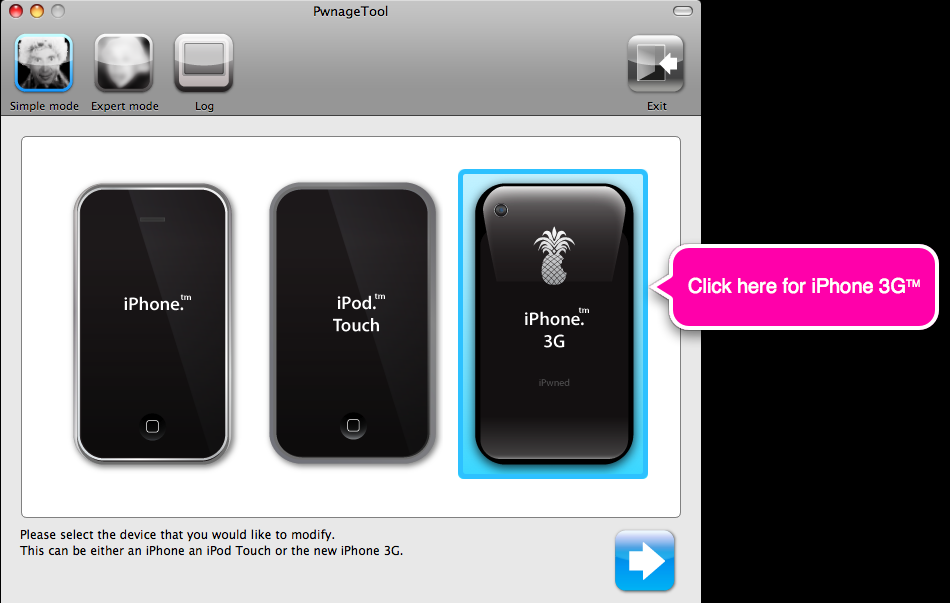
Fire up PwnageTool 2.0 and select the type of your device and Simple Mode :
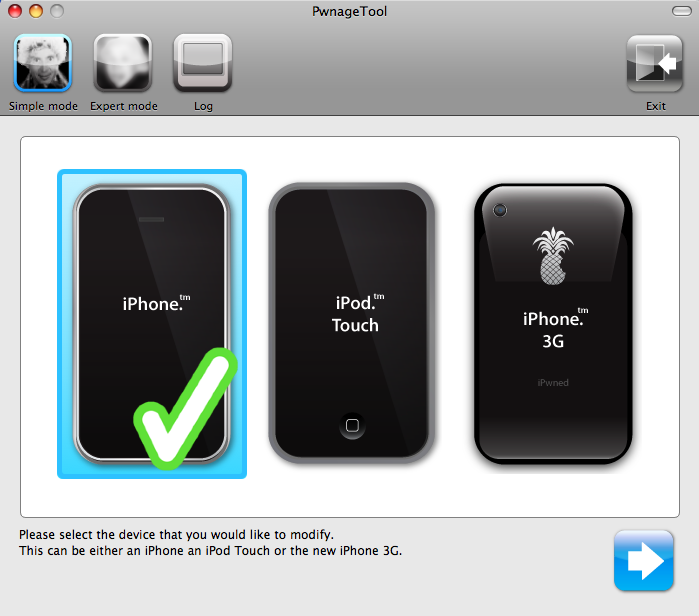
Click on the next button and select your ipsw file you downloaded earlier:
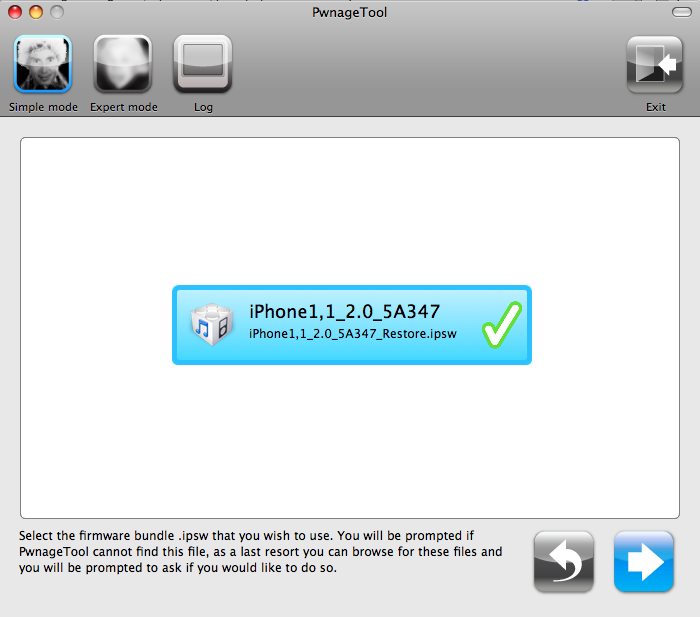
Select No on the following screen:
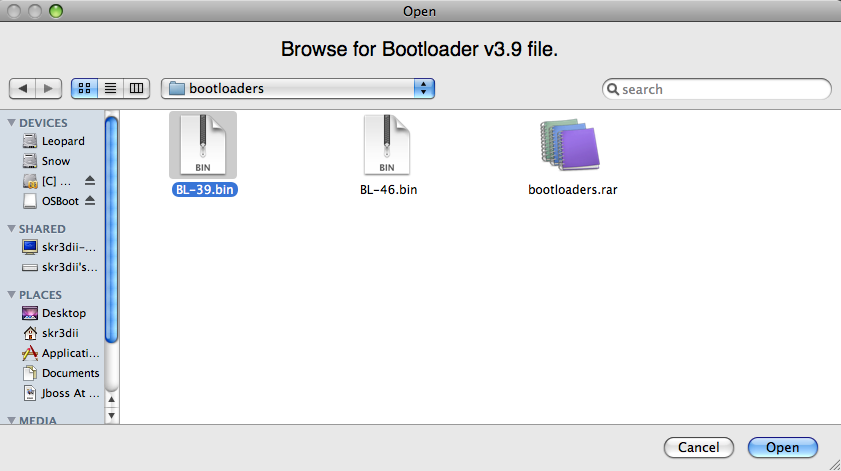
Select Yes on the following screen and browse to BL-39.bin file you downloaded :
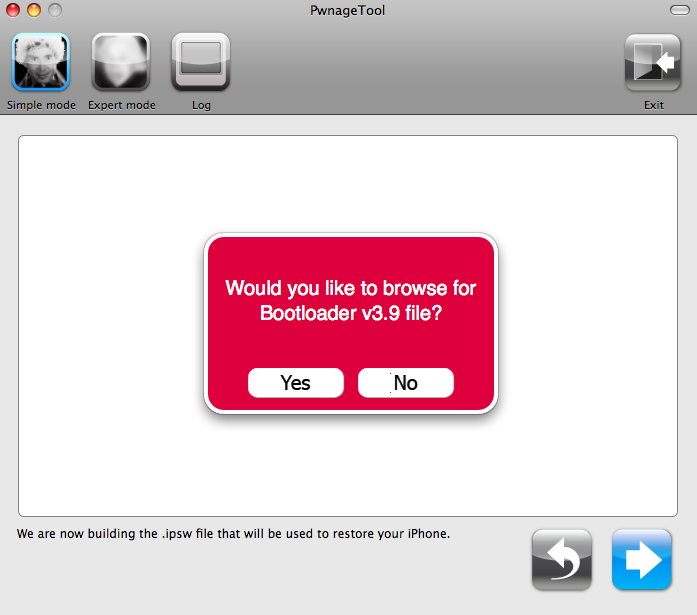
Do the same steps for 4.6 bootloader as you did for 3.9 bootloader, select No :
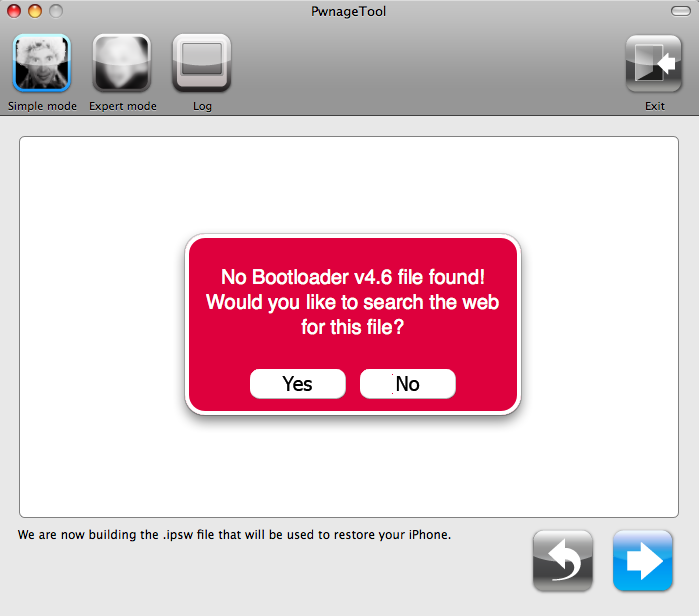
Select Yes :
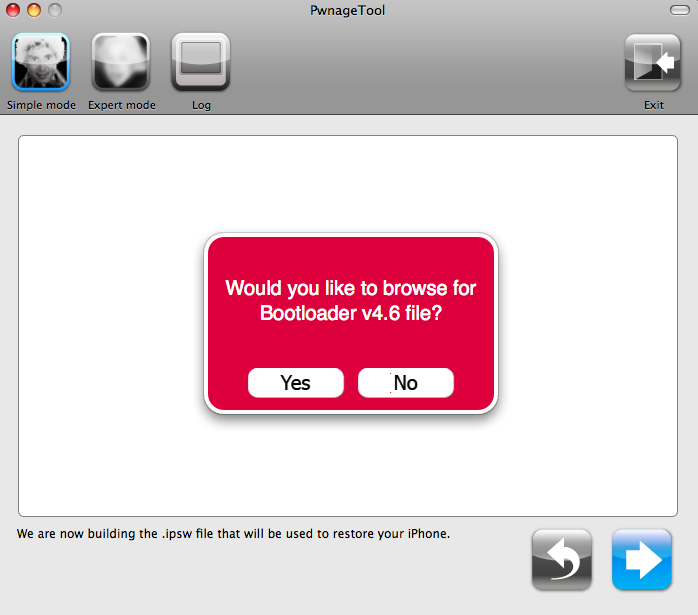
Browse to the BL-46.bin file you downloaded earlier :
In the next screen, select yes as it is your first time you are building the custom firmware:
Pwnage will ask you next if you own an AT&T subscription, or you have an officially
unlocked iPhone like one you can get in many European countries.
If you need activation and unlock reply No, otherwise reply YES :
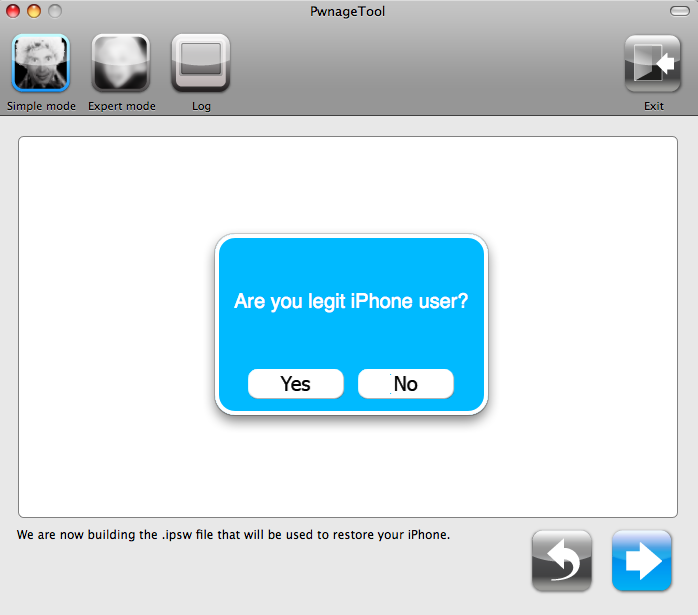
Wait while Pwnage is building your 2.0 custom firmware :
Enter your mac OS X password when required :
Is you iPhone already running a pwned firmware or not ?
If you restored to a stock Apple’s firmware, you should reply NO.
If you run 1.1.4 pwned by Pwnage 1.2, reply YES.
Select NO if you are not sure!
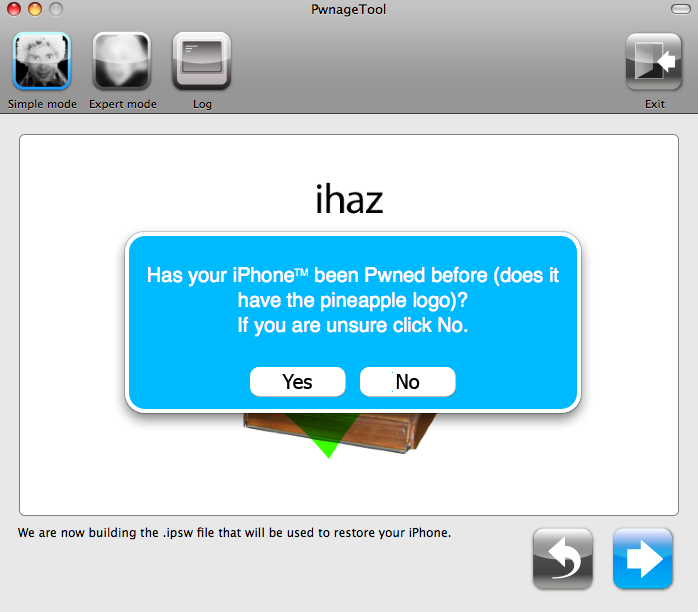
Now if you selected NO, you need to connect your iPhone to your mac now.
It will use DFU mode to restore the custom firmware on an unpwned iPhone:
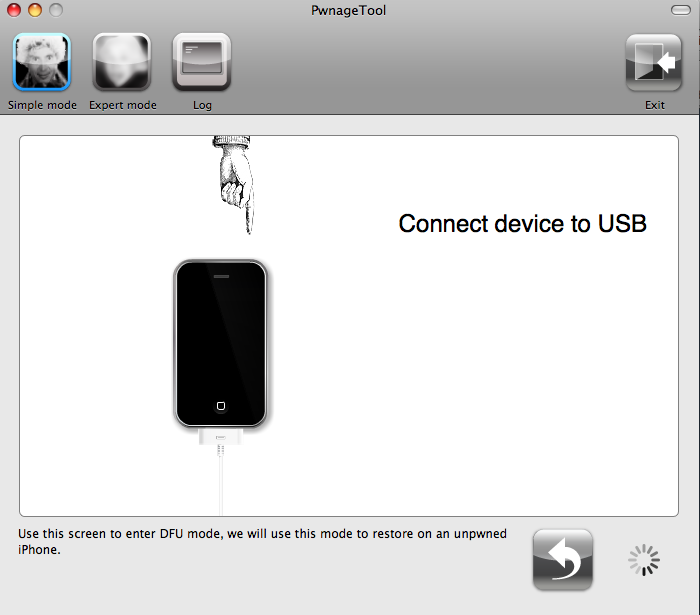
Your iPhone should then be in DFU mode :
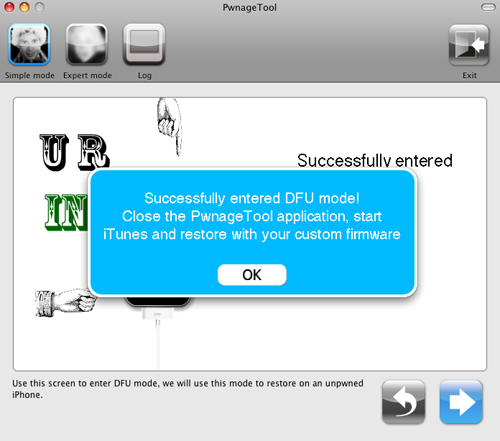
Close Pwnage application and fire-up iTunes. It should detect your iPhone in recovery mode.
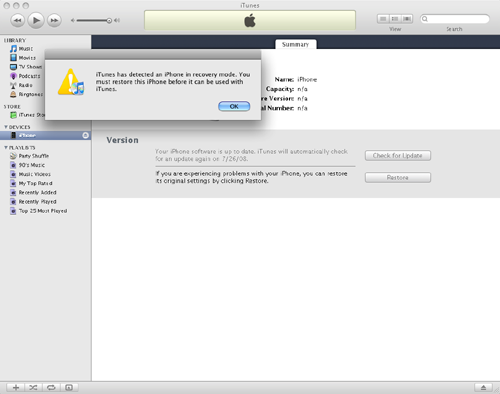
Click OK, then restore to your custom firmware that is on your Desktop.
You need to hold the Option key and hit restore button.
Then choose your custom IPSW from your desktop.
If you choose that you have no legit iPhone, BootNeuter application will start on your
iPhone to activate it and unlock it. Let it run before you use your iPhone.
Congrats, you got a pwned iPhone with 2.0 firmware.
That is activated, unlocked, jailbroken with Cydia installer.
Old community applications are not yet compatible with the new 2.0 firmware.
So you need to wait developers to update their software.
Patience, they will show up in Cydia installer.
skr3dii, out.
Some useful tips from the dev team :
P.S. If you get Error 1600 from iTunes (or if you see in your log a failure to prepare x12220000_4_Recovery.ipsw), try: mkdir “~/Library/iTunes/Device Support” ;
if that directory already exists, remove any files in it. Then re-run PwnageTool.
P.P.S. If DFU restores are giving you trouble, another route to pwned 2.0 for 1G owners
is to use first pwnage at 1.1.4. Once you are pwned there, you can do a normal
recovery-mode restore to your custom 2.0 ipsw. BTW the iPhone does *not* need to be
pre-pwned to be able to DFU-restore into a pwned ipsw — it needs to be pre-pwned only
for normal recovery-mode restores of custom ipsw’s.
P.P.P.S. Mail application not working at 2.0? Please restore to your custom ipsw (you don’t
need to DFU restore if you are pwned, normal restore will work now too) but then
select “Set up as a new iPhone” when iTunes asks.
Your first sync will bring back all of your settings anyway.
Similar Posts:
40 Pings to “Pwnage 2.0 - Jailbreak iPhone 3G now !”
200 Responses to “Pwnage 2.0 - Jailbreak iPhone 3G now !”
-
1. Lane Says:
July 19th, 2008 at 6:49 pmwhere is the extended post? link?
Thank You!!!!!!! :-))))
So will this allow the 2.0 3G phones to run app store apps and AppTap installer apps together? I’m on AT&T already so don’t personally care about that part. just want my SMB prefs and themes back more than anything.
-
2. chris Says:
July 19th, 2008 at 6:52 pmyou forgot a link to the extended post guy….
-
3. Jesse Says:
July 19th, 2008 at 6:56 pmWhere is the extended link?!?
-
4. Raj Says:
July 19th, 2008 at 6:57 pmWhere is the extended post???
-
5. Renan Says:
July 19th, 2008 at 7:11 pmHi guys!!
just had some problems to jailbreak the new 3g but it’s already past.. very easy.
1 - with iPhone switched off
2 - leave iTunes open (it worked for me)
3 - open the pwnage tool
4 - select device
5 - select the packet data that appears on window/ continue
6 - once is done should direct to screen that helps you to put the device in DFU mode, follow instructions you must pay attention. easy but tricky
7 - when you are on the iTunes screen (holding the option key = alt) press restore, and it should open new window.
8 - look for the packet created on your desktop, select it. and run the restore.while is loading the update you should see a pineapple on your iPhone screen
if any questions just make a reply i’ll be arround.
Bye everyone
-
6. Zeonardo Says:
July 19th, 2008 at 7:15 pmExtended link…
Perhaps it’s somewhere and I’m missing? -
7. John Says:
July 19th, 2008 at 7:18 pmI have a pwned 1st gen iphone and am trying to update to 2.0. When I try to restore with the custom firmware I get error 2001. Any ideas?
-
8. Ian Says:
July 19th, 2008 at 7:19 pmJust click the title of the article at the top… durr =P
http://www.macgeekblog.com/blog/archive/2008/07/19/pwnage-20-jailbreak-iphone-3g-now.html -
9. Pete Says:
July 19th, 2008 at 7:22 pmHaving trouble witht the firmware file, it just looks like a normal folder icon how do i make it a .ipsw file
-
10. admin Says:
July 19th, 2008 at 7:24 pmPete, try downloading with firefox.
Safari will unpack the ipsw. -
11. Pete Says:
July 19th, 2008 at 7:25 pmdont worry found out, if anyone has the same problem re-zip the file and rename it .ipsw
-
12. Jess Says:
July 19th, 2008 at 7:35 pmok so if i have windows xp and i have 2.0 firmware ipod touch purchased last october and was never jailbroken, i cant jailbreak it? i realize everyone whose been jailbreaking tonight is on a mac..
-
13. Jose M Says:
July 19th, 2008 at 7:37 pmI have an unlocked first generation iphone 1.1.4.
I would like to know if after upgrading to firmware 2.0 the iphone will still be unlocked?
Should I upgrade firmware using itunes, and the use the pwnage tool to jailbreak?
I want to be sure that after this process my first gen iphone with 2.0 jailbroken, will still be unlocked.
Help is appreciated. -
14. wirespy Says:
July 19th, 2008 at 7:38 pmI installed the custom_restore.ipsw and see the Pineapple logo cept my phone is not activated. I thought this tool would jailbreak, activate, enable 3rd party apps with Installer, enable Apple AppStore and also it will unlock the iPhone 2.0 firmware.
How do I get my iphone 2.5G activated????
-
15. wirespy Says:
July 19th, 2008 at 7:45 pmNevermind, I figured out how to create a custom package including activation in EXPERT MODE, nice!
-
16. Pete Says:
July 19th, 2008 at 7:50 pmhow do you put the phone in DFU, i keep getting a screen that says its failed to go in to DFU mode
-
17. Jose M Says:
July 19th, 2008 at 7:56 pmwirespy c are to share some tips, you seem to know much more than me about this.
Thnx -
18. Pete Says:
July 19th, 2008 at 7:59 pmjust bricked my phone, waiting for it to restore, having trouble putting it in DFU mode
-
19. Jose M Says:
July 19th, 2008 at 8:01 pmPete
to put in DFU i read something about pushing power button and home button at the same time for ten secs, then relesing power, but not home.
I am not su100% sure..
wish i could be more helpful -
20. Mike Says:
July 19th, 2008 at 8:01 pmThe program never asks for any bootloader. It goes directly to the “we will now create an ipsw” screen. Then later fails the dfu mode.
-
21. Jad Says:
July 19th, 2008 at 8:02 pmI get the same problem as Pete. Something about U Fail can’t go in DFU mode. Was the iPhone meant to be connected the whole time?
-
22. Dennis M Says:
July 19th, 2008 at 8:06 pmI also keep getting failed DFU, trying many different ways
-
23. scott Says:
July 19th, 2008 at 8:07 pmI went through everything and it all seemed to work, but it is now unactivated. When iTunes launched (after the restore), it says that an invalid SIM is inserted. How do you get it to activate and unlock? I don’t see anything about bootneuter.
-
24. Jose M Says:
July 19th, 2008 at 8:16 pmScott I have the same issue here. Any ideas?
-
25. Mike G Says:
July 19th, 2008 at 8:28 pmIf you are having problems entering DFU Mode:
mkdir “~/Library/iTunes/Device Support” where ~ is your user directory (usually your name)
If you don’t have that directory the tool will fail!!
-
26. Gunnar Says:
July 19th, 2008 at 8:30 pmSka man ha 7.7 på iTunes?
-
27. andy Says:
July 19th, 2008 at 8:34 pmSo do we just create a folder in the iTunes folder and call it Device Support?
-
28. Gunnar Says:
July 19th, 2008 at 8:40 pmAre u going 2 have 7.7 in itunes?
-
29. 34 Says:
July 19th, 2008 at 8:40 pmAnyone know if this will change any network settings that might cause it to use a different system & end up w/ a $5000 packet bill (this happened to a friend of mine that unlocked his WinCE smartphone)?
-
30. Dennis M Says:
July 19th, 2008 at 8:42 pmurg, having some issues, ill wait for devteam to talk more “soon”
-
31. admin Says:
July 19th, 2008 at 8:43 pmJust opened a new forum for you guys : http://forum.macgeekblog.com/viewforum.php?f=11
Do not hesitate to post your issues, tips, etc…
-
32. admin Says:
July 19th, 2008 at 8:44 pmWhoops, almost 5 am here, I need to catch some sleep.
Happy pwnage everyone! -
33. andy Says:
July 19th, 2008 at 8:45 pmusing iTunes 7.7, 1st gen iPhone upraded to 2.0 from jailbroken 1.14
I made a Device Support folder in the iTunes directory and successfully got in DFU mode. Pwnage told me to quit the app and install my custom firmware.
How do I do that? -
34. Ian Says:
July 19th, 2008 at 8:49 pmandy:
you open iTunes, it’ll say the phone needs to be restored, hold down Option and click the Restore button, this will give you a dialog box asking you to find an ipsw file, so select the 2.0 Custom ipsw file you created on your desktop with PwnageTool. -
35. andy Says:
July 19th, 2008 at 8:50 pmWTF!? So I thought it was strange that the app asked for my admin password during the process, and now all of a sudden I have another computer connected via network called ‘thompson’?
There are no other computers anywhere (I mean anywhere, I’m in a very remote location) near me at all, so wtf?
-
36. Jon Says:
July 19th, 2008 at 8:53 pmHey i keep getting an error 6
any idea whY?
-
37. Jon Says:
July 19th, 2008 at 9:01 pmi only get an error 6
-
38. Mike G Says:
July 19th, 2008 at 9:02 pmHere’s what I experienced and if it helps you guys great. First you MUST have the (username)/library/itunes/device support
folder for the tool to not fail. Second is you need to have your iphone unplugged until the tool tells you to connect it to usb. THEN follow the tool prompts to enter dfu mode. It really is well done as it tells you what to press and for how long with a countdown and everything. IF you fail it will let you try again. THEN it will tell you to go into iTunes and restore the phone using the custom ipsw it just created on the desktop (I beleive it’s hold “option” and click restore and it will let you chose the ipsw file to restore from).
Hope this helps. -
39. Connor Says:
July 19th, 2008 at 9:04 pmi cant figure out hhow to jailbreak my iphone 3g its not working when i do it. it says that it’s the wrong firmware when i clicked on the firmware that i downloaded from this website. i need to figure it out!!!!
-
40. andy Says:
July 19th, 2008 at 9:11 pmhaha, so I’m thinking that ‘thompson’ is an old name for this iPhone (I got it from a friend when he got his 3G).
Anyway, successfully Pnwned.
Just to recap.
1st gen iPhone - V1.14 previously jailbroken and upgraded to 2.0 before running pwnage tool.
iTunes 7.7
Needed to create a new folder called ‘Device Support’ in the iTunes folder in my libary. ie: “~/Library/iTunes/Device Support” where ~ is your user directory (usually your name) (Thanks Mike G) to allow the iPhone to enter DFU mode.
Some fancy finger work is needed to hold down the power and home buttons in the right order for the right amount of time, but you get to re-try when you mess up
Once thats all done youre told to quit the app and restore the iPhone via iTunes.
Option + Click on the restore button in iTunes to browse you mac and select the IPSW file pwnage created on your desktop. (Thanks Ian)
It’ll run through restore mode and everything else without any input needed by yourself and finally reboot with nice fresh 2.0 software and unlocked for my very non at&t sim card.
-
41. Pete Says:
July 19th, 2008 at 9:21 pmMike G, did everything you said had my iphone unpluged and when it packed the .ispw file it came up with the failed to enter DFU mode, the phone wasnt pluged in and didnt ask me to plug it in, i have made the device support file in my library aswell
-
42. Pete Says:
July 19th, 2008 at 9:24 pmto everyone that has Pnwned there iphone where you using an old iphone or the new 3G iphone
-
43. feDe Says:
July 19th, 2008 at 9:33 pmThanks for the guide! Worked like a charme! =)
-
44. phyburn Says:
July 19th, 2008 at 9:37 pm@pete the problem is your device support FOLDER. Run this command in your terminal: mkdir ~/Library/iTunes/Device\ Support/
That will fix your problem. Don’t say you already have that folder just lulz me and run that command! When you are done do:
cd ~/Library/iTunes/Device\ Support/
lsMake sure when you run the ls you don’t see anything.
Cheers
-
45. Javier Says:
July 19th, 2008 at 9:38 pmI put (an error) bootleader version 3.9 and i have the other (4.6) and now i run PWnage tool and i cant change the bootleader version!…Please help!..how can i do that!!
Javier
-
46. Squuiid Says:
July 19th, 2008 at 9:39 pmOk, would someone mind answering me this?
From what I can tell, once we have the _Custom_.ipsw file, can this be used to restore from DFU with iTunes on a PC and NOT a Mac?Need to VNC into Mom’s PC in England from my Mac here in US and Pwn her phone!
Does the ipsw file work fine with iTunes on a PC? If so, I can just ftp the file to her and upgrade with just iTunes 7.7 on the PC. -
47. willyboy Says:
July 19th, 2008 at 9:45 pmWorks great.. Thank you! If you only have windows, just go to the mac store and use one of there computers////
-
48. willyboy Says:
July 19th, 2008 at 9:45 pm“their” I am a dipshit
-
49. Ty Says:
July 19th, 2008 at 9:45 pmEverything seemed to run fine but when I put in my TMobile sim I get:
The SIM card inserted in this iPhone does not appear to be supported.
-
50. Adrian Says:
July 19th, 2008 at 9:50 pmmy phone is stuck in DFU. its a 2g. please someone help!
-
51. Pete Says:
July 19th, 2008 at 9:50 pmthanks everyone, especialy Mike G and phyburn, Iphone is jailbreaking as i type this thanks again. Anyone know any apps that work with 2.0
-
52. steph Says:
July 19th, 2008 at 9:57 pmhi there,
just tried to open up pwnage tool. no chance no window appearing! do i first have to restore the phone?? any help? -
53. Pete Says:
July 19th, 2008 at 10:03 pmUnplug your IPhone before doing the following steps
1 - Open Terminal
2- Run this command: mkdir ~/Library/iTunes/Device\ Support/
Then run: cd ~/Library/iTunes/Device\ Support/
3 - open the pwnage tool
4 - select device
5 - select the packet data that appears on window/ continue
6 - once is done should direct to screen that helps you to put the device in DFU mode, follow instructions you must pay attention. easy but tricky
7 - when you are on the iTunes screen (holding the option key = alt) press restore, and it should open new window.
8 - look for the packet created on your desktop, select it. and run the restore.These 8 steps where made by everyone that has posted on here
-
54. david Says:
July 19th, 2008 at 10:12 pmI just finished, i choose to backup my iphone thinking i would get just mucic and contacts, etc… i ended up getting all of my old apps from 1.1.4 installer. everything was running extremely slow. anyone else have this issue? I am trying right now as a new phone
-
55. david Says:
July 19th, 2008 at 10:14 pmjust finished, everything works fine. I’d recommend not doing a restore of settings.
-
56. steph Says:
July 19th, 2008 at 10:33 pmyear thanks a lot pete! but i still have the problem, that there opens no window for the selection of the device… has the phone to be connected in recovery mode before launching pwnagetool?
-
57. Adrian Says:
July 19th, 2008 at 10:35 pmit seems be turning on and off by itself and then going back into DFU mode…
-
58. Vagabundo23 Says:
July 19th, 2008 at 10:39 pmWhy I try to install PwnageTools 2.0 and it bounce in dock and don’t open
-
59. Paul Says:
July 19th, 2008 at 10:43 pmHi all,
I have just woken up in Hong Kong to find a nice little present waiting for me.
I was lucky enough to get the new iPhone 3G on Monday and so gave my wife my old jailbroken iphone (used ziphone) at 1.1.4 version.
When I saw that you could not get installer yet, I decided I did not need mine broken as all I wanted was the installer app to get some old apps that I used to have like SMB and lexitron (love that game )
So I downloaded the pawnage tool and the restore versions along with the bootloader versions. I unzipped the bootloader versions.
I then turned my wife’s iPhone into DFU mode and docked it. I then ran the pawnage tool and selected the correct formware and found the 3.9 and 4.6 bootloaders. It then made the firmware no problem and then it said it failed to get into DFU mode and asked if I wanted to try again, I said yes and it allowed me to turn off the iPhone and then it fired up and gave instructions on screen to get it into DFU mode which I followed and then all worked OK. It takes about 10 - 15 minutes for the restore process to work and you get several message in itunes along the way telling you what is happening.
The iphone then fires up and bootneuter does it’s work.
It then resets one more time and all is OK, one jailbroken 2g iPhone with ver 2.0 firmware.
It then also allowed me to put the apps I had purchased at the app store for my 3g iphone onto my wife’s phone. Everything working OK, no problems with mail or safari wihch I read has been a problem for some people.
All in all, my wife is now very happy and is playing bejeweled as we speak. She misses lexitron alos but we can wait until someone upgrades this for 2.0 or it get onto the app store…
cheers dev team,
Paul
-
60. steveo Says:
July 19th, 2008 at 10:44 pmhi all. the instructions work well, i had to try a couple of times, finally worked
but one little problem, now my phone has no network carrier (ie, no phone service) i can unlock my sim, but nothing happens after that. Otherwise, everything else works perfect, thanks -
61. Playstation Says:
July 19th, 2008 at 10:54 pmMine was running smooth until I got the custom firmware restored.. for some reason when it boots up I see that pinnaple logo, then after a few seconds it restarts again and again (loop),
Any ideas
-
62. Pete Says:
July 19th, 2008 at 10:57 pmsteph, you dont need to put the iphone in recovery mode before running pwnage, if you have already put it in recovery mode then restore it using itunes with un hacked firmware, itunes will download this itself, when the iphone is recovered run the terminal comands then run pwnage and follow the steps
-
63. maurice no Says:
July 19th, 2008 at 11:06 pmSo I just did everything and my iphone is now unlocked! Yay! But can i sync now or will that un do it?
-
64. Ty Says:
July 19th, 2008 at 11:37 pmTried it like 3 times
Everything seemed to run fine but when I put in my TMobile sim I get:
The SIM card inserted in this iPhone does not appear to be supported.
-
65. mark iv Says:
July 19th, 2008 at 11:41 pm.My phone is activated and jailbroken thanks to you guys..How do I verify the unlock really worked? I used a diff sim other than ATT and the phone went to the emergency screen with the USB cable and Itunes logo.
Pleas Help -
66. nd Says:
July 19th, 2008 at 11:41 pmSquuiid, I did exactly that - made the custom ispw file on my mac, transferred it to my Windows laptop, and restored using the custom ispw on my Windows machine.
-
67. Greg Says:
July 19th, 2008 at 11:55 pmGreat. Downloaded it, but the program doesn’t seem to fully launch. I’m just left with the icon in the dock, and in the menu (and you can’t access any sub menus from that). Any clues gratefully followed.
-
68. steph Says:
July 20th, 2008 at 12:00 amhow ever i try. there is no launch of pwnagetool. just as greg described… any solution?
-
69. punk Says:
July 20th, 2008 at 12:02 amTool
Download
:
http://rapidshare.com/files/131013196/PwnageTool_2.0.zipor
-
70. jont Says:
July 20th, 2008 at 12:06 amI’m on a 1st gen phone. I performed a restore on my phone prior to running Pwnage2. The benefit is that it will create a backup of firmware which is placed in the ~/Library/iTunes/Device Support folder (so don’t erase that file!). It will also upgrade you to 2.0, so make sure you select “No” when Pwnage2 asks you if your iPhone has been pwned.
Great work devteam! Great tutorial macgeek!
Ciao.
-
71. vmx Says:
July 20th, 2008 at 12:06 ami have the same problem with the pwnagetool dont start
any solution? -
72. Pete Says:
July 20th, 2008 at 12:38 amonly thing i can think of is 2 delete the program and re download it
-
73. Gianluca Says:
July 20th, 2008 at 12:49 amJailbreak a legit 3G iPhone…..
These are the exact steps i followed:
1. With iTunes closed, the iPhone unplugged and an empty ~/Library/iTunes/Device Support folder created, open the Pwnage tool. (very important as I could not get it to work with iTunes open and the phone plugged in)
2. Pick 3G phone
3.Select pre-downloaded firmware
4.Click ok to continue creating .ispw file on desktop
5. I clicked yes to legit iPhone user (because i am).
..Building…
6.Entered my password when required
7.I clicked “No” to indicate i had never used pwned my phone before. Pwnage tells me to connect my phone to USB. (iTunes will open)
8.Follow the simple on screen instructions to enter DFU mode.
9.Restore (Command + click-Restore) the phone using the .ipsw file created in step 4.
…pineapple appears on iphone and short while later itunes will say your phone is restored to factory defaults (factoy pwned defaults that is
Hope this helps somebody
-
74. Christian Says:
July 20th, 2008 at 12:54 amSteph: I got two Macbook Pro’s and I had the same problem with the pwnage tool not starting on the first computer it tried to use it on. Switch computer and now it works. Strange.
The computer it works on was bought in February 08 and the other one was bought in May 08. So… maybe it’s some kind of firmware related stuff on your computer?
-
75. Pete Says:
July 20th, 2008 at 1:12 ammade a torrent of the file if anyones haveing trouble downloading it
-
76. Pete Says:
July 20th, 2008 at 1:19 amchristian, i brought my mac in may 08 and have every software update that has been released and it opened first time for me
-
77. vmx Says:
July 20th, 2008 at 1:27 amPete
You have mac with leopard 10.5.4 i know this OS have trouble with pwtool
if you can run the software with the leopard 10.5.4 can you upload a tutorial please.
thank you -
78. AJ Says:
July 20th, 2008 at 1:30 amI followed all the steps and everything worked except now all my phone does is blink with a pineapple.. anybody have any answers?
-
79. vmx Says:
July 20th, 2008 at 1:37 amonly 1 anserw what is you OS ?
-
80. AJ Says:
July 20th, 2008 at 1:39 amMac tiger
-
81. Chris Says:
July 20th, 2008 at 1:44 amOK! BIG THANKS! –>> BUT!
I am having EXACTLY the same problem as STEVEO (POST # 59 above) where everything works PERFECTLY but . . .
I don’t get a carrier logo / singnal / 3G icon and cannot make a phone call.
WTF??? Please help! Im still trying again.
A thousand thanks!
-
82. Michael Says:
July 20th, 2008 at 1:51 amWorked great! Small hiccup but works now when I did the following…
Had to download OpenSSH from Cydia and login under root through terminal and do the following though to make mail.app and safari.app work…
chmod 777 /var/mobile/Library/Mail
chown mobile /var/mobile/Library/Cookies/
chown mobile /var/mobile/Library/Cookies/Cookies.plistHope this helps!
-
83. rotarian Says:
July 20th, 2008 at 1:55 amit seems be turning on and off by itself and then going back into DFU mode… can anyone give advise on what I did wrong during the process??
-
84. David Says:
July 20th, 2008 at 1:55 amhi i just did all the steps and well , when i turn on the phone it apears the dev-logo but after that the phone its locked (i dont have the att sim) and i cant use nothing just emergency calls
what can i do???????? -
85. macgirl Says:
July 20th, 2008 at 1:56 amThe Pwnage did the Jailbreak and installed Cydia (with some apps) but it broke the SIM recognition (Mexican iPhone with Telcel as only valid carrier).
-
86. jordan Says:
July 20th, 2008 at 2:07 ami have completed the unlock of my 3G iphone and everything looks good except that it isn’t reading my ATT account anymore. I can connect to wifi and have the cydia installer, but it isn’t associating with my ATT account. any suggestions? i’ve tried restarting it to no avail. thanks.
-
87. n Says:
July 20th, 2008 at 2:34 amIf it fail with “unable to enter DFU mode” just enter retore mode manually, then open itunes. It will recognize an iphone in restore mode. Manually select the ipsw file on your desktop by holding the option key while pressing restore
-
88. adam Says:
July 20th, 2008 at 2:40 amhas anyone successfully jailbroken an AT&T 3g iphone and still have phone service?
-
89. Chris Says:
July 20th, 2008 at 2:41 amOK UPDATE! I WAS having the same problem as “Steveo” (post # 59 above) where everything worked perfectly except after restoring from the NEW, custom image . . . . no carrier logo / no service / no 3G icon.
BUT! I fixed it!!!!
I rebuild a new custom image using EXPERT MODE –>> TURNING ACTIVATE iPHONE OFF before building custom image.
I am a legit iphone user and don’t need to use another carrier’s SIM. . . . I just want the iPhone Jailbroken to have SSH access etc.
INSTRUCTIONS - CKISS JULY 19 2008
1. mkdir ~/Library/iTunes/Device” “Support
Empty / delete that folder and make sure there is a new one EMPTY2. remove the iPhone from the USB connection
Put iPhone Firmware 2.0 Folder containing –>> iPhone1,2_2.0_5A347_Restore.ipsw on desktop3. LAUNCH PWNAGE TOOL 2
Expert mode but TURN ACTIVATE OFF before building if legit iPhone user.
(Experienced errors three times on July 19th with no carrier / service after building custom restore )4. BUILD CUSTOM RESTORE IMAGE
Before the prompt for admin password the image will open. Insert Custom icons / sounds / make custom alterations before continuing for a ready custom restore image with all the iPhone goodies ALREADY IN!
5. PAWNAGE TOOL will prompt for what to do next. Connect iPhone to USB and follow prompts exactly into DFU mode.
6. When prompted QUIT PWNAGE TOOL.
7. Itunes will idenitfy the phone in DFU mode just OPTION CLICK the RESTORE button and select new custom image.
DONE!!!! WORKS!!! THANKS!!!
Now if this will work for ANY SIM with ACTIVATION of NOT AT&T customers . . . .that would be AWESOME.
Please post if you know HOW or WHY it won’t work if I choose ACTIVATE IPHONE before the build.- I have a iPhone 3G with AT&T service (two different AT&T SIMS and both phone numbers - both working!)
- 24″ new iMAC with OSX.5.4 Leopard & iTunes 7.7
- SSH access no problem now!BIG THANKS!!!!
-
90. uma Says:
July 20th, 2008 at 3:05 amSuccessfully updated an iPhone 2.5G from 1.1.4 to 2.0. It works just as advertised.
Does the 2.0 firmware add a new “contacts” widget to the iphone as one seems to have appeared on my home screen? Is it something the pwnage tool does?
-
91. terry Says:
July 20th, 2008 at 3:12 ami have a unlocked 1.1.4 iphone…(probably unlocked with ziphone but not sure as mobile phone company unlocked it) and i want to use the new pwnage tool to get it to 2.0.
can i just use the pwnage tool right away?
or
restore to 1.1.4 original firmwire via itunes and then update to 2.0 via itunes and then use the pwnage tool?
i first brought my iphone after the 9th Nov if that helps?
Thank You so much!
-
92. uma Says:
July 20th, 2008 at 3:17 amterry: mine was a 1.1.4 unlocked with ziphone and I just used the pwnage tool right away. no problems at all.
-
93. Iain Benson Says:
July 20th, 2008 at 3:27 amI am having exactly the same problem with my O2 sim in the UK - it will not connect to the phone network any more!
-
94. adam Says:
July 20th, 2008 at 3:30 amchris thanks for the directions but im stuck kinda early on.
I have downloaded the firmware for the 3g from the link at the top of the page. However pwnage cant find the ispw so it goes to expert mode. Then when I browse for the file I can find the file i downloaded (extracted) but there is nothing in the contents I can open….
-
95. Iain Benson Says:
July 20th, 2008 at 3:46 amThanks for the tip Chris, I just recreated the custom image for my 3G iphone with activate iphone turned OFF. It now works fine and I can connect to O2 no problem. Woohoo!
-
96. Chris Says:
July 20th, 2008 at 3:53 amIAIN !!!! Excellent!!! - My Pleasure!
Woohoo is right!
@ADAM –>> I had exactly the same problem at first because SAFARI was set (in Safri preferences) to “auto open Safe Files after downloading”.
Turn that OFF.
YOU WANT AN .IPSW file - without a ZIP extension - that looks like a package icon resembling a piece of LEGO (cube)
If you are seeing a “folder” with 2 dmg files and a few more files and folders, PAWNAGE will not recognize it as something you can choose to build from.
PAWNAGE also seems to look on the DESKTOP for the .ipsw file.
I had mine INSIDE A FOLDER that I named “IPhone Firmware 2.0 Orig” and pwnage tool just found it.Good luck!
-
97. Lisa Says:
July 20th, 2008 at 4:34 amthanks for all the instructions and comments, works a treat!
I did make one stupid mistake which some others may also have done judging by some of the above comments- when restoring after successful pwnage, i selected the wrong restore file from my desktop and so bootneuter did not start up and i was stuck with the invalid sim card message and emergency calls only. I just reran the pwnage tool and selected the right file next time.
-
98. Q Says:
July 20th, 2008 at 4:54 am@UMA
do you confirm I need to restore my iphone with “iPhone 2.0 (5A347) firmware for 2G (3998)” before running pwnagetool ? (and how do i restore?)
many thanks
iPhone 1.1.4. US jailbreak + unlock with Ziphone
-


July 19th, 2008 at 10:55 pm
[...] Some guides I’ve found so far: Macgeekblog [...]
July 19th, 2008 at 11:31 pm
[...] when required : Is you iPhone already running a pwned firmware or not ? If you restored to a [COLOR=#42AFDC ! important][COLOR=#42AFDC ! important]stock[/color][/color] Apple
July 20th, 2008 at 12:51 am
[...] guys at MacGeekBlog has posted a very good tutorial on using Pwnage Tool 2.0, I have personally tested the tool with my iPhone (1st generation), and [...]
July 20th, 2008 at 12:52 am
[...] http://www.macgeekblog.com/blo…..g-now.html innovacionesNos ilumino con su sabiduria, en Julio 19, 2008 como a las 11:16 pmEnlace Permanente [...]
July 20th, 2008 at 12:54 am
[...] gente de Macgeekblog ha publicado una pequeña guía paso a paso para hacer el jailbreaking de un iPhone de primera [...]
July 20th, 2008 at 1:03 am
[...] Vond deze link, misschien hulpzaam voor sommigen onder ons, waaronder mezelf Macgeekblog [...]
July 20th, 2008 at 1:39 am
[...] For a comprehensive guide on how to carryout the unlock process, refer to this post. [...]
July 20th, 2008 at 2:19 am
[...] Mind you, there are plenty of people trying to get this one so be patient as you download those 19.7MB. Full instractions can be found in here. [...]
July 20th, 2008 at 2:19 am
[...] avoir lu des pages et des pages des forums, je vous linke LE tutorial très bien fait ici (étape par étape) qui contient les liens vers les firmwares et bootloaders indispensables à [...]
July 20th, 2008 at 3:06 am
[...] instructions available yet, but a good summary of what to do, and how to do it is available here. I’ve also included some of my notes here too.Pwning your phone, as it is now being referred [...]
July 20th, 2008 at 3:32 am
[...] Handige tutorial voor iedereen die er niets van snapt: Mac OSx86 [...]
July 20th, 2008 at 3:34 am
[...] Handige tutorial voor iedereen die er niets van snapt: Unlock, jailbreak [...]
July 20th, 2008 at 3:38 am
[...] out the MacGeek blog for the step-by-step instructions with screenshots that I followed to jailbreak and SIM unlock my [...]
July 20th, 2008 at 3:46 am
[...] stap uitgelegd met plaatjes) dwz Iphone uitzetten etc… Dan lukt het wel. Meer uitleg (Engels) Pwnage 2.0 - Jailbreak iPhone 3G now ! Mac OSx86 Legit betekend officieel, aangezien 99,9% een illegale, immers 1e versie Iphone heeft, dus hier [...]
July 20th, 2008 at 7:01 am
[...] (Mac en Windows)) - Hackint0sh (Pwnage tool 2.0) - Coachhowland (The Joshua Tree - Pwnage 2.0) - Macgeekblog (Pwnage 2.0 - Jailbreak iPhone 3G now !) Stem of voeg toe [...]
July 20th, 2008 at 9:08 am
[...] Pwnage 2.0 - Jailbreak iPhone 3G now ! » Mac OSx86. This entry was posted on Sunday, July 20th, 2008 at 10:08 am and is filed under Blog. You can follow any responses to this entry through the RSS 2.0 feed. You can leave a response, or trackback from your own site. [...]
July 20th, 2008 at 9:31 am
[...] when required : Is you iPhone already running a pwned firmware or not ? If you restored to a [COLOR=#42AFDC ! important][COLOR=#42AFDC ! important]stock[/color][/color] Apple
July 20th, 2008 at 9:55 pm
[...] your iPhone using a Mac there is no need for me to write a guide as there are many such as this one. On the other hand, for the PC many people do not know how to do it and that is why I am here to [...]
July 20th, 2008 at 11:55 pm
[...] to the T. Else you might face some unnecessary problems. For a step by step guide, go to this website. One cool thing about this upgrade is that all your setting will be backed up to iTunes. So once [...]
July 21st, 2008 at 12:50 am
[...] Jailbreak iPhone 3G now [...]
July 21st, 2008 at 3:00 am
[...] when required : Is you iPhone already running a pwned firmware or not ? If you restored to a [COLOR=#42AFDC ! important][COLOR=#42AFDC ! important]stock[/color][/color] Apple’s firmware, you should reply NO. If you run 1.1.4 pwned by Pwnage 1.2, reply YES. [...]
July 21st, 2008 at 3:45 am
[...] hoitui helposti hyvien ohjeiden avulla ja alustavasti vaikuttaa siltä että kaikki toimii. Kirjoitellaan sitten lisää jos ei [...]
July 21st, 2008 at 4:40 am
[...] will jailbreak but does not yet unlock the 3G iPhone) with the latest firmware (version 2.0). This guide provides really clear instructions on the process. The procedure worked flawlessly and took [...]
July 21st, 2008 at 10:03 am
[...] Aquí hay un tutorial para realizar el jailbreak del firmware 2.0 en tu iPhone de primera generación. [...]
July 21st, 2008 at 11:04 am
[...] As per the very helpful Mac OSx86 blog: [...]
July 21st, 2008 at 12:08 pm
[...] As per the very helpful Mac OSx86 blog: [...]
July 21st, 2008 at 2:48 pm
[...] firmware 2.0 (using the recently released Pwnage tool) I decided to give it a go myself using this handy walkthrough. The tool basically builds a custom image which iTunes then uses to flash the device. The update [...]
July 21st, 2008 at 7:53 pm
[...] Anyway, if you want to unlock it step by step with nice and clear screenshots then this site might be for you. Pwnage 2.0 - Jailbreak iPhone 3G now ! [...]
July 22nd, 2008 at 4:10 pm
[...] dev team released its pwnage tool, allowing you to jailbreak your phone. There’s a pretty exhaustive step-by-step of how to use the 3g pwnage tool here; the only thing I’d add to it is this bit about how to fix a DFU mode bug: The error that [...]
July 24th, 2008 at 11:03 am
[...] (Mac en Windows)) - Hackint0sh (Pwnage tool 2.0) - Coachhowland (The Joshua Tree - Pwnage 2.0) - Macgeekblog (Pwnage 2.0 - Jailbreak iPhone 3G now [...]
July 26th, 2008 at 9:45 am
[...] unknown wrote an interesting post today onHere’s a quick excerptToday is the day, you gotta love sundays! After many, many cryptic messages and wait constantly refresh dev team blog, finally it’s there!! The new Pwnage 2.0 !!! Make some noize !!! [...]
July 30th, 2008 at 12:03 am
[...] tortuca wrote an interesting post today onHere’s a quick excerptToday is the day, you gotta love sundays! After many, many cryptic messages and wait constantly refresh dev team blog, finally it’s there!! The new Pwnage 2.0 !!! Make some noize !!! [...]
July 31st, 2008 at 8:18 am
[...] Comments robin on Pwnage 2.0 - Jailbreak iPhone 3G now !ary on Pwnage 2.0 - Jailbreak iPhone 3G now !ary on Pwnage 2.0 - Jailbreak iPhone 3G now !iStephy on [...]
August 9th, 2008 at 2:31 am
[...] ready for PwnageTool 2.0.2 ! » Mac OSx86 on PwnageTool 2.0.2 in the early morning !admin on Pwnage 2.0 - Jailbreak iPhone 3G now !admin on Get ready for PwnageTool 2.0.2 !PwnageTool 2.0.2 in the early morning ! » Mac OSx86 [...]
August 13th, 2008 at 12:29 pm
[...] a little help… then here you go. For PC see the WinPwn 2.0 instuctions and for Mac see the Pwnage 2.0 [...]
August 14th, 2008 at 5:22 pm
[...] http://www.modmyifone.com/wiki/index.php/Pwnage_2.0_Guide http://www.macgeekblog.com/blog/archive/2008/07/19/pwnage-20-jailbreak-iphone-3g-now.html [...]
August 28th, 2008 at 5:18 am
[...] As per the very helpful Mac OSx86 blog: [...]
September 16th, 2008 at 9:14 am
[...] kännykään 2.1 ohjelmaversion. Asennus sujui tuttuun tyyliin Pwnage Tool -ohjelman avulla. Vanhat ohjeet olivat toki tarpeen. Asennuksessa ei ollut mitään kovin eksoottista. Hidasta oli ja pikku mokan [...]
September 18th, 2008 at 1:31 pm
[...] when it is completed.” DevTeam/Download PwnageTool Step by Step Instructions (by BigBoss) Step by Step Instructions (by MacGeek) Step by Step Condensed Video (by Meebz) « Protect Your iPhone (in style) Free [...]
September 27th, 2008 at 4:27 pm
[...] Il programma usato per effettuare l’operazione è Pwnage 2.0. Tutte le immagini che vedrete di seguito sono prese dal sito MacGeekBlog.com. [...]