

QuickPwn (QuickPwn beta (2.0.2) (2319)) is the new tool from the dev team.
It allows you to instantly jailbreak your iPhone and activate it if required.
This new tool is very useful for those who do not need to unlock their iPhone.
It is much quicker than PwnageTool and does not require restoring firmware.
Follow our tutorial to instantly jailbreak your device with QuickPwn.
Warning: If you have a 3G iPhone and you need to unlock it, stay away from this method. It will update the baseband of your iPhone which may render it unlockable in the future when a solution comes out. You have been warned. Only for 3G legit users.
Click on the link above to read the tutorial.
As you might have noticed, the tool is made for windows.
If you are running a mac, get Parallels or VMWare Fusion and install Windows.
You will also need to download firmware 2.0.2 for your device (iPhone 2G, 3G or iPod).
Before you start you need to update your iPhone to the latest 2.0.2 firmware via iTunes.
You will need iTunes 7.7.1, be sure you have the latest iTunes version or it won’t work.
Connect your iPhone to iTunes and sync it first, iTunes will create a backup.
Then you can hit the update button to install the latest 2.0.2 firmware.
Remember QuickPwn will activate (if required) and jailbreak, but not unlock.
Do not use QuickPwn if you need to unlock your iPhone.
Also if you were running *free* cracked iPhone apps, they won’t launch after the 2.0.2 update
until you jailbreak your device with Pwnage. Let’s do this!
Fire up QuickPwnGui120.exe and select your type of device:
Click next and browse to the Apple’s 2.0.2 firmware you downloaded here
Click next once you selected the right firmware (2.0, 2.0.1 and 2.0.2 are supported):
Next select if you want Cydia, Installer and custom logo to be installed :
Click the GO button and follow the instructions in the command-line windows :
If you are running in a virtual machine like me, connect your iPhone to the VM.
I am using Parallels, so I had to click on the usb icon in the lower right corner:
Hit the GO button and you should see a command-line window.
Wait until you get the following message:
Turn off your iPhone and hit enter once it is done. You’ll get this screen :
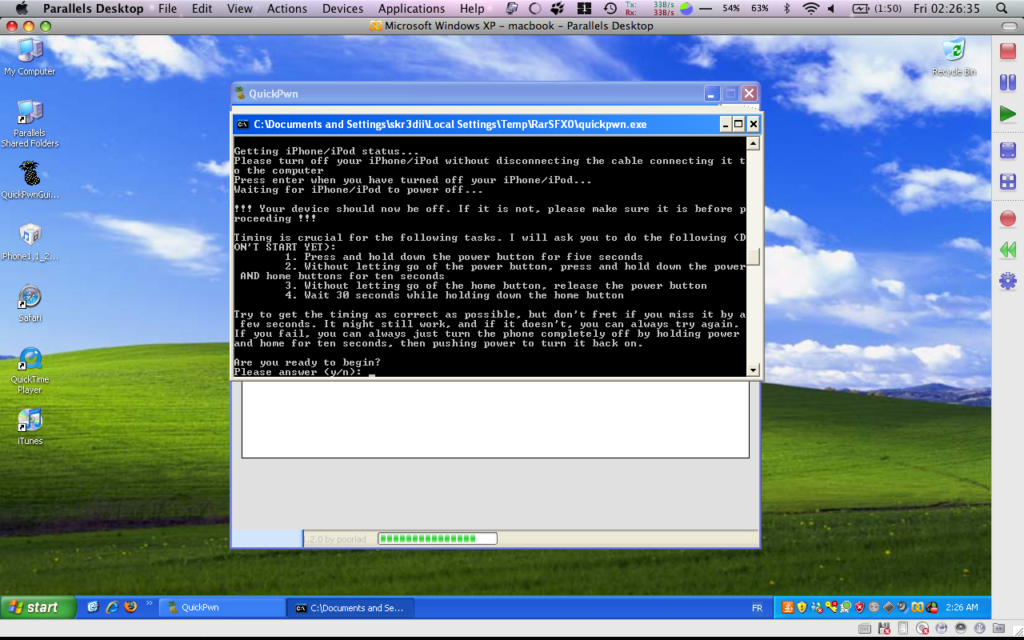
Next you will need to enter DFU mode, just follow the instructions on the screen above.
You should see that windows detected the phone in DFU mode:
If you are running Windows in a virtual machine, you might be stuck at this screen:
If it happens, just pull out usb cable and plug it back in (ghetto usb reset - thx planetbeing).
Also if iTunes pops up in your mac native OS, just quit it.
The process in the command line window should resume.
Wait until the end, your iPhone should reboot. Do not care about the pineapple logo.
If you choose not to update logos, they won’t be updated, trust me.
Once rebooted your are (h)ac(k)tivated and jailbreaked.
Enjoy!
Similar Posts:
3 Pings to “QuickPwn Tutorial - Easy Jailbreak for 2.0.2 fw”
67 Responses to “QuickPwn Tutorial - Easy Jailbreak for 2.0.2 fw”
-
1. Jonas Says:
August 23rd, 2008 at 3:30 amHi, after i clicked go, promt started as it should for about 5sec then promt closes and im back to the go window. What can be wrong?
-
2. Darnell Says:
August 23rd, 2008 at 12:20 pmHow do I get my apps to work, after doing this?
everything was moved to /var/stash/applications? -
3. admin Says:
August 24th, 2008 at 7:16 amJonas it happened to me too because I was not running the latest iTunes version. Make sure you have the latest version 7.7.1 of iTunes.
-
4. admin Says:
August 24th, 2008 at 7:27 amDarnell, you can put your apps in /Applications which is a symbolic link to the folder /var/stash/Applications.xxxxx This folder contains all the native applications and you can easily add yours.
-
5. mr.x Says:
August 24th, 2008 at 10:42 amummm I’m using a real pc running iTunes 7.7.1 using the newest quickpwn I do everything right timing firmware version etc. But it says congratulations you succesfully entered dfu mode after holding down the home button for only 8 secs total then it counts to a 100% and poof nothing! Pls help!!!
-
6. Darnell Says:
August 24th, 2008 at 3:45 pmI think what my problem was is that I didn’t the mobile privateframework replacement. My problem was that all my cracked apps were invisible on my phone even though I could see them in my directory and this is after changing to the proper permissions.
-
7. refused9150 Says:
August 24th, 2008 at 7:04 pmI am still getting the crash shortly after hitting go. It just gives me the error report crap and crashes. I am running the most current version of itunes. I have tried this on all 3 of my computers and it does the exact same thing. Any help would be amazing.
-
8. ViRuSi Says:
August 24th, 2008 at 8:40 pmi have done as it says….all went well,i got the pineapple logo but as i checked my FW it is still 2.0.1…
-
9. admin Says:
August 25th, 2008 at 1:59 amViRuSi, did you update your iPhone to the latest 2.0.2 firmware via iTunes ?
It’s the first required step of the tutorial. kthx. -
10. ThomasM Says:
August 25th, 2008 at 3:42 amHi there!
First I would like to thank you for your step by step walkthrough. As I am not familiar with all that stuff, it is nice to see that poeple like you just want to help poeple like me.I received my iPhone 3G two days ago. I was amazed to see that the 2.0.2 FW was already installed on it!
I have a contract with T-Mobile (Germany), my SIM card won’t be activated before 1st of September, because my old contract will expire at that date. I am only interested in Jailbraking my iPhone3G. Can I still do it even if the SIM card is not activated?
And last but not least, can this OP make my iPhone unusable?Sorry for these “noob” questions and thank you for your efforts.
Cheers, from Germany.
ThomasM -
11. admin Says:
August 25th, 2008 at 7:00 amThomasM, you don’t have to wait, QuickPwn will then fake activation for you and jailbreak the firmware. Of course you won’t have service until your SIM is activated. Anyway I would wait until your sim is activated to have a clean activation process via iTunes (not hacked/patched). It’s up to you, in case of troubles you can always put the iphone in DFU mode and restore the firmware. So no worries and happy jailbreaking.
-
12. ThomasM Says:
August 25th, 2008 at 9:17 amThank you for the fast feedback
I activated my iPhone as soon as I got it :-p I can upload apps (from app store) and do everything with it (iPod, notes, settings…) but as the sim is still “deactivated” I can’t call or use any 3G apps such as browsers, mails… I will wait indeed the 1st of September to run the QuickPwn.
Once more big up to you for helping us to have even more fun with our iPhones.
Cheers,
Thomas -
13. AngelChrist Says:
August 25th, 2008 at 10:39 amI have the same problem as MrX, any solutions?
-
14. mlhoenig Says:
August 25th, 2008 at 3:35 pmVMWare and Parallels don’t help those of us running non-Intel Macs…
-
15. Deactivated Says:
August 26th, 2008 at 4:41 amRan this beautiful program on my PC for my 2G iPhone. The phone is unlocked but it is not activated (can’t make calls)?!? Tried restarting… any ideas?
-
16. Deactivated Says:
August 26th, 2008 at 5:05 amI took a 1st gen unlocked iPhone, upgraded it to 2.0.2, and ran QuickPWN. Now it is locked again. My sim is from Rogers, the Canadian carrier of the 3G iPhone, and they know I have a 1st gen phone.
Any idea how to unlock it? Or do I revert back to 2.0.1?
-
17. siom Says:
August 26th, 2008 at 12:24 pmThank you for the wonderful tutorial and the easy quikpwn tool.. worked great for me!! on the first try even
-
18. Outlawz Says:
August 26th, 2008 at 1:22 pmHello,
I downloaded the latest qwkpwn file that comes up as a zip file but everytime I try to extract the zip it says it is corrupted. Am I doing something wrong?
-
19. atul sethi Says:
August 26th, 2008 at 2:26 pmI have jail broken on a 2g phone and have installed the cyinda and the installer can work on wi fi but can not use the phone as soon as i put the sim card only emergency phone screen showes up pleae help
-
20. TjockSmock Says:
August 27th, 2008 at 5:01 amHey guys, i might have a solution for you guys who cant call with your 2g-phones after using quickpwn! run Cydia, download a app. called “BootNeut”, install this app, then run it.. the phone will restart after opening BootNeut because it needs to check some settings.. when the phone restarted, run bootneut again and use fallowing settings
Neuter: ON
FakeBlank: OFF
Unlock: On
then unlock it, just wait.. takes a few minutes.. then you’re ready to go
-
21. HELP Says:
August 28th, 2008 at 6:53 pmHello,
I have an 2g Iphone w 2.0.2 that I want to unlock, don’t care about jailbreaking as much as having it capable of be used on any carrier. I down loaded the Pwnage tool to my desktop (Dell PC using XP) but the.tzb file is not recognized so I can’t open it. How do I use this tool?
I also downloaded the QuickPwn 150 tool. When I launch it and get to the step to Browse for the firmware it freezes up after selecting the file off my desktop. I downloaded the firmware 2.0.2 to my desktop from the provided link. When I say it freezes what I am trying to say is it shows a spinning gear next to the browse box for a few seconds and then goes away but the “Arrow Button” at the bottom of the page never activates and just stayed grayed out.
What do I need to do to proceed? I have itunes 7.7.1 if that matter.
Thanks in advance!
Jason
-
22. boneshaker Says:
August 29th, 2008 at 12:01 amI just got the 3g iphone 2.0.2 firmware without a supported carrier, If I jailbreak with the new quickpwn , will I still be able to UNLOCK later on if and when that becomes available.
-
23. admin Says:
August 29th, 2008 at 12:20 am@Jason : PwnageTool won’t work on Windows XP, it’s for mac. You need to get QuickPwn, but you will not be able to unlock your iPhone with version 150, as I said it’s for jailbreak only. You may want to try the newest version of QuickPwn RC3 which does unlock 2G iPhones with Bootneuter application. To use Bootneuter, you can follow instructions of TjockSmock at comment #20. Get the latest QuickPwn here: http://www.macgeekblog.com/blog/archive/2008/08/25/pwnagetool-203-quickpwn-150-released.html Good luck!
-
24. admin Says:
August 29th, 2008 at 12:24 am@boneshaker: Do NOT use QuickPwn with a 3G iPhone if you need unlock. It will upgrade your baseband possibly rendering your iPhone unlockable when a solution comes out. Use ONLY PwnageTool for jailbreaking 3G iPhones then go buy FuriouSim: http://www.furiousim.com to unlock your 3G iPhone. 2G iPhone users are safe, they can use either PwnageTool or QuickPwn.
-
25. HELP Says:
August 29th, 2008 at 1:21 pmAlright thanks for the help Admin.
I downloaded the QuickPwn RC3 (although I couldn’t find it on your link)
From there it was able to recognize the 2.0.2 Firmware that I had saved to my desktop but now it is asking to Browse for Bootloader 3.9 and 4.6
I found a place to dowload those from but when I go to browse for them they don’t show up. When I look at the folder outside of QuickPwn it shows the bootlaoders are there but in an unrecognized file extension.
What should I do next? I don’t see this explained in the tutorial.
Thanks again!
Jason
-
26. HELP Says:
August 29th, 2008 at 1:46 pmNevermind my last post. I ws able to find another source to download the bootloaders from and it worked perfect. That was amazingly easy! Thanks again for all the help!
-
27. admin Says:
August 29th, 2008 at 4:09 pmHELP (doh!) If you had searched the keyword ‘bootloader’ on my blog using the search textbox in the top right corner (http://www.macgeekblog.com/?s=bootloader), you would have found this post, the first in the results that contains the links to the bootloaders : http://www.macgeekblog.com/blog/archive/2008/07/19/pwnage-20-jailbreak-iphone-3g-now.html
Another trick, and I’m sure you now this sentence “google is your friend”, and I would even add more, “site:” is your best friend! Simply type the keywords you are looking for on my blog in google and add this : “site:macgeekblog.com”, example: http://www.google.com/search?hl=en&client=firefox-a&rls=org.mozilla%3Aen-US%3Aofficial&hs=Lbr&q=bootloaders+site%3Amacgeekblog.com&btnG=Search
Anyway, glad to see you worked things out Jason!
-
28. atul sethi Says:
September 1st, 2008 at 5:42 amhi guys
thanks your help, have unloked my 2g phone but it works only in emergency mode ie when on phone cannot use the other functions, any way out. thanks in advance -
29. Plz Help Says:
September 2nd, 2008 at 1:50 amQuickpwn worked smooth but when I insert my T-mobil chip it locks the phone and requires me to connect to iTunes.
I have downloaded the Bootneuter and went thru the flash process but as soon as I put in my t-mobile chip it locks again.Could anyone plz help
-
30. boneshaker Says:
September 2nd, 2008 at 3:27 pmHi, is me again.In your last reply to my comment,you mentioned that if I wanted to unlock my 3g iphone running the 2.0.2 firmware I should purchase furiousim.Just wanted to get it a little clear,between furiousim and the new no cutting turbosim which is the best of the two.Appreciate in advance with your expert advice.
-
31. admin Says:
September 2nd, 2008 at 3:39 pmboneshaker, the only thing I know is that FuriouSim works, and you get all the stuff to update it when new firmware comes out. I have neer tried the “no cutting turbosim”, don’t know if it works. I would advise you send an e-mail to steve@furiousim.com, tell him I told you to email him, he will answer all your questions about FuriouSim.
-
32. Shoms Says:
September 2nd, 2008 at 6:40 pmHello, I just bought an iphone 3G 8gb with my Fido contract (Canada) and i want to jail break it. Keep in mind I am new to this. Even though the process seems pretty self explanatory, i have a few questions.
I have already already updated my firmware to 2.02, so i think i am ready to go.
- my phone is already activated via Fido, i can still use quickpwn right? in this version there is no option to activate or not, unlike winpwn.
- do i still need to update the official 2.02 even if my iphone is v2.02?
- what are the chances i will brick my iphone?Thanks a bunch!
Shoms -
33. Shoms Says:
September 2nd, 2008 at 6:45 pmI hope it merges double posts >.<.. but i have another question:
- does quickpwn work well with vista? -
34. Khraudo Says:
September 2nd, 2008 at 6:59 pmby power button, do they mean the sleep/wake button on the top right of the iphone 3G? thanks.
-
35. admin Says:
September 3rd, 2008 at 1:44 amShoms, you are ready to go, you don’t need to update since you are already on 2.0.2. QuicPwn will detect if your iPhone is already activated, so it won’t hacktivated it if it’s not needed. Give it a try, you can still restore if something goes wrong.
Khraudo, yes.
-
36. atul sethi Says:
September 3rd, 2008 at 10:00 amhey guys
can anybody help me with my question in item no 28
cheers -
37. admin Says:
September 3rd, 2008 at 10:58 amatul sethi, I suggest you build a custom firmware with PwnageTool or WinPwn depending if you are a mac or windows user then restore your iPhone with that firware. I guess you need to unlock your device ? Already connected to iTunes ? What does it say ?
-
38. Shoms Says:
September 3rd, 2008 at 3:19 pmadmin, i just jailbroke it successfully! thanks! kinda late, but does jailbreaing void warranty?
-
39. admin Says:
September 3rd, 2008 at 3:29 pmDon’t worry Shoms, if you need to return your iPhone to Apple, you can always restore to stock Apple firmware. And if you ever run into troubles, just use DFU mode to force a restore. No way to vois your warranty with a jailbreak unless you use some Zi… shitware
-
40. Chris Says:
September 3rd, 2008 at 5:07 pmOMG…. I have just gone through all of the instructions to the letter on my iphone 3g 16gb, and everything seems to have run to completion, and the dos window has closed, but it has now been 20 minutes, and the iphone is just sitting there with a black screen, and a picture of a pineapple on it?
Have I bricked it?
Please help
-
41. Chris Says:
September 3rd, 2008 at 5:15 pmJust a quick update to number 40, it is still sitting with a black screen and a picture of a pineapple, but the iphone drive is now present in ‘my computer’, and it is occasionally vibrating…. ok ok, I know its silly to panic, but I am getting pretty worried now.
How long does the process normally take?Thanks
-
42. admin Says:
September 3rd, 2008 at 5:31 pmChris, don’t worry, just put your iPhone into DFU and you will be able to restore a stock firmware via iTunes, but I would wait until QuickPwn does it’s job. If you feel like it’s stuck, just go DFU.
-
43. Chris Says:
September 3rd, 2008 at 5:33 pmsorry to be thick, but what is dfu…… thanks very much for your reassuring answer
-
44. Chris Says:
September 3rd, 2008 at 5:54 pmI have just had another look, and quickpwn says you must be running version 2.01, I was sure it said 2.02 before I started. I guess it won’t work anyway with my iphone 3g?
I have found out what dfu is, and have tried pressing the buttons, but it will not go into dfu mode, I then re-loaded quickpwn, and left it with the black screen/ pineapple icon, and will keep my fingers crossed it works out ok.
-
45. wero Says:
September 3rd, 2008 at 7:51 pmi installed quick pwn 2 0 2 on my i pod touch.. i followed the instructions correctly and in the moment and when the i pod rebooted it didn´t work i am desperate please help
-
46. boneshaker Says:
September 3rd, 2008 at 11:22 pmHello fellas,well I jailbroke my iphone 3g 2.0.2 and it went great thanks to you guys for your great work.But when I connect to itunes, I get an error message saying that it failed to connect to my iphone because it could not locate the hardware.What is the best thing I can do to fix this. ERROR CODE: OX E8000035
-
47. Chris Says:
September 4th, 2008 at 12:46 amNIGHTMARE!!
I have a new iphone 3g 16gb,I went through the instructions exactly using vista with the original ipsw
everything appeared to be fine during the install, but after the doc window closed there was only a black screen with a pineapple on it (for the last 6 hours)I then re-run quick pwn, and got exactly the same thing…… holding the power and home button simply turns it off, and when i turn it back on, i have the same black screen and pineapple.
When I connect it to the computer, I get error message OX E8000035, which means that I cannot restore it back to an official version
Please can someone help, have I bricked the phone?
I have tried re-running quick pwn multiple times now with exactly the same results.
-
48. Chris Says:
September 4th, 2008 at 1:09 amI couldn’t get the phone to connect to the computer, and couldn’t get it to reset to dfu, so in a last ditched attempt, downloaded the dfu app on the following web page, this allowed me to reset the phone back via itunes so I am now back to where I was at the beginning.
Thanks for all of your help
Chris
-
49. Chris Says:
September 4th, 2008 at 1:10 amhttp://limitededitioniphone.com/how-to-put-the-iphone-into-dfu-mode/
-
50. That Guy 2-1 Says:
September 4th, 2008 at 11:04 amI’m brand spanking new to this iPhone stuff and I just Jailbreak’d my 3G and had no problems … thanks! Now to see what else I can do…
-
51. atul sethi Says:
September 4th, 2008 at 11:50 amthanks Admn
if you could clarify for me, and soyry for dumb questions
I have already unlocked my phone, you suggest to make a coustom software with pawanage tool, i had done so with the firmware 2.01 and it had not worked can you advice which version is to be used for the 2.02
thanks in advance -
52. Mark Says:
September 4th, 2008 at 1:10 pmI got a hand-me-down iPhone from my sister. I upgraded the firmware to 2.0.2 using iTunes. Of course, after that, it wants me to register it and pay for AT&T service. That’s where QuickPwn 1.5.1 comes in…
I run QuickPwn 1.5.1, following the instructions exactly, and everything appears to work perfectly. The only issue is that when I put my AT&T SIM in the phone, I never get phone service.
Thoughts?
Thanks in advance,
Mark -
53. rob Says:
September 7th, 2008 at 3:00 pmHi Chris,
How’s your brandnew iphone 3g?
is it ok?I’ve been reading this blog and all i can see are the problems that had cropped up after doing jailbreaking using this latest quickpwn
any encouraging post after using this amazing program?
i would like to try it but im a bit skeptical because of all the problem im reading in this blog
admin pls help
-
54. admin Says:
September 7th, 2008 at 3:41 pmrob, people are leaving feedback most of the time when things do not work. Otherwise they are happy and not complaining. Although there are comments reporting success on the blog. Just try those software they work, back up your data in iTunes and you will be fine. If anyhing goes wrong, put your iPhone in DFU mode and restore it with stock firmware.
-
55. That Guy 2-1 Says:
September 7th, 2008 at 11:39 pmjust did it again to my wife’s phone with no issues.
What do you mean by update the base band? Is it network related? would it reduce my reception any? Ive noticed bad reception in some areas new was just wondering cos 2.0.2 was supposed to fix a 3g reception issue … Am I right or am I worrying for no reason? Also is this basebamd update reversible with a restore from iTunes.
-
56. atul sethi Says:
September 8th, 2008 at 8:44 amguys
thanks a lot got everything working finally, thanks for you support -
57. dan Says:
September 9th, 2008 at 10:50 amran the quickPWN and bootneut successfully on one iphone yesterday, but tried on another today and can’t get it to sync after full activation (QuickPWN - Cydia - BootNeut etc). any suggestions? am thinking of restoring to 1.1.4 and re-running ziphone as last resort.
-
58. boneshaker Says:
September 10th, 2008 at 2:17 amI uploaded some NES ROMS to my iphone 3g 2.0.2 with WINSCP,But after that when I launch my NES application it still says no ROMS found.I NEED SOME HELP GUYS.
-
59. besh Says:
September 11th, 2008 at 12:26 amon the last step ,I stuck at tcommand screen. I just pull out usb cable and plug it back ,the process in the command line window didn’t resume
-
60. adam Says:
September 12th, 2008 at 6:21 pmhy guys
i have jail broken on a 3g iphone and have installed the cyinda and the installer can work on wi fi but can not use the phone as soon as i put the sim card only emergency phone screen showes up pleae help -
61. JERRY Says:
September 13th, 2008 at 8:22 amPlease help!!! I Ran QuickPwn, browsed for the 2.01 FW and followed all the instructions, after the command prompt I got the 100% done and the phone resetted with the pineapple logo, I thought everything was fine, but now my phone wont boot up, Itunes wont recongnize it and it wont bypass the startup apple logo. Please HELP ME.. I have money for anyone who can help me.
-
62. adam Says:
September 14th, 2008 at 4:18 pmno body can help ???
-
63. admin Says:
September 14th, 2008 at 6:08 pmJERRY, use the donation button in the sidebars
Just put your iPhone in DFU mode and restore it.
-
64. boneshaker Says:
October 29th, 2008 at 10:30 pmHi guys,appreciate all the work.My question is with my commcenter on my iphone 3g 2.0.2.I wanted to hack it,which requires that i disable it.But after I do my iphone doesn’t stay on for more than a minute then it restarts.Is there anything I could do to stop that.
-
65. Michael Says:
November 4th, 2008 at 9:51 amDoes QuickPwn work with vista?
-
66. ajson32 Says:
November 22nd, 2008 at 5:13 pmhi, i downloaed this and did everything right. The pine apple showed up on my phone but the cydia and installer applications did not show up. also my phone isnt working right now and freexes up often. help please?
-
67. White Says:
December 6th, 2008 at 11:08 pmI have a 2G iPhone and when im done my iPhone goes to the “Slide for emergency” screen.
What do i do?!


August 24th, 2008 at 1:33 pm
[...] deze link: QuickPwn Tutorial - Easy Jailbreak for 2.0.2 fw
September 3rd, 2008 at 11:38 pm
[...] tutorial Itt le
September 11th, 2008 at 12:33 am
[...] This guide also only covers OSX specific software for the first essential step. An alternative Windows guide can be found at macgeekblog. [...]